
Player Tech Support
This document can be reached by visiting Artist Notes page and clicking on the period (.) at the end of the sentence. The document has various how-2’s and hints on how to post to the website and archive file prep. View the site overview video HERE.
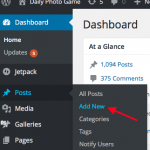 DASHBOARD: Click on Posts>Add New
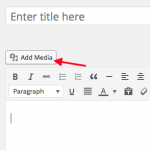 ENTER TITLE IN TITLE AREA
POST: Click on Add Media button to upload your photo.
ENTER TITLE IN TITLE AREA
POST: Click on Add Media button to upload your photo.
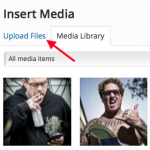 MEDIA: Click on Upload Files, locate your image (desktop or mobile) and upload.
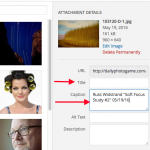 MEDIA: Add your Title to the Title field. Type in your Caption, example: Russ Widstrand “Title” 04/05/16. Click on blue button, Insert into Post.
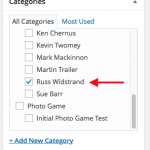 POST: Back in the Post, locate Categories, click the box next to your name.
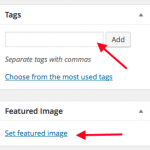 POST: Below those settings locate, enter Tags then click on Set Featured Image below tags.
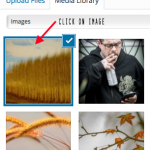 FEATURED IMAGE: Click on your image to select it. The click blue button to set the Featured Image
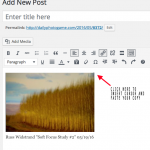 POST: Back in your Post now, place the cursor to the top right of the image, paste your Artist notes. Add a title to your post. CLICK PUBLISH.

WHAT TO CONSIDER ABOUT PLAYING IMAGES FOR THE GAME:
- If you would not put the image in your portfolio, perhaps it should not be played for the game.
- If the image looks like it could be purchased online at a stock site, perhaps it should not be played for the game.
- If the image was motivated for commercial reasons, perhaps it should not be played for the game.
- The DPG project would benefit from some kind of social or moral point of view in your images.
- The image should speak for itself.
- Your image’s connection to the previous image should be clear.
POSTING:
HOW TO POST TO THE DPG WEBSITE:
Prep your file to 960 px in long dimension (WATCH FILESIZE VIDEO), write your artist notes in a mail document, paste your keywords and attach your image. SAVE AT 6+ JPG COMPRESSION LOGIN to the Dashboard of the DPG site with any browser, desktop or mobile. View the ScreenCast how-2 video HERE. (MAKE SURE YOU READ THE INSTRUCTIONS TOO. THERE ARE SOME CHANGES)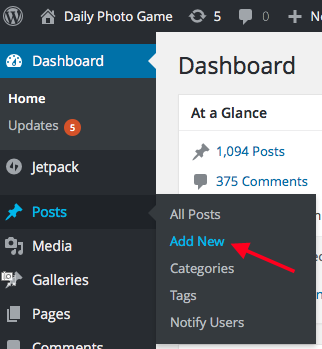 DASHBOARD: Click on Posts>Add New
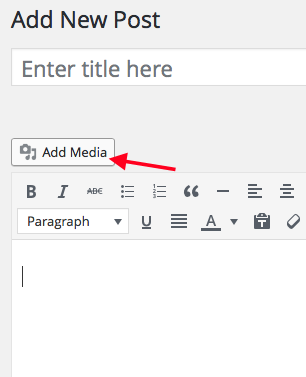 ENTER TITLE IN TITLE AREA
POST: Click on Add Media button to upload your photo.
ENTER TITLE IN TITLE AREA
POST: Click on Add Media button to upload your photo.
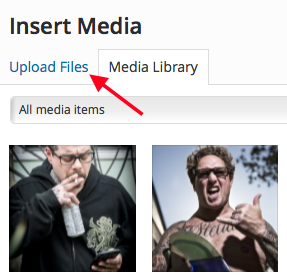 MEDIA: Click on Upload Files, locate your image (desktop or mobile) and upload.
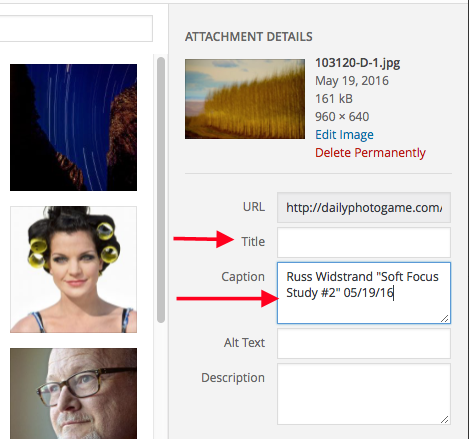 MEDIA: Add your Title to the Title field. Type in your Caption, example: Russ Widstrand “Title” 04/05/16. Click on blue button, Insert into Post.
 POST: Back in the Post, locate Categories, click the box next to your name.
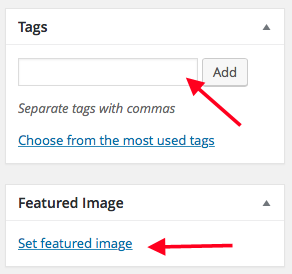 POST: Below those settings locate, enter Tags then click on Set Featured Image below tags.
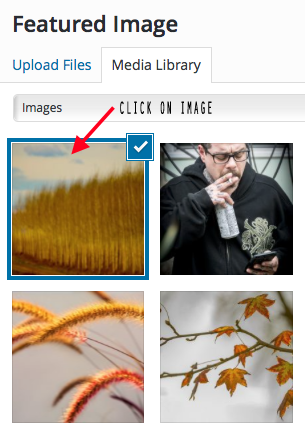 FEATURED IMAGE: Click on your image to select it. The click blue button to set the Featured Image
 POST: Back in your Post now, place the cursor to the top right of the image, paste your Artist notes. Add a title to your post. CLICK PUBLISH.
SOCIAL AND EMAIL USERS:
EMAIL USERS INSTRUCTION:
Tip: we have 6378 subscribers, so imagine the scroll bar to the right of the list as your means of dividing up and selecting the list in 6-8 segments. Click on first name, scroll 1/6 down and shift-click on a name, it will select all of the previous names. When the program has finished the first email batch, scroll down to the bottom of the selected names, click off the blue selection to the next name, and then repeat the above. Give the program time to complete each batch, around 3 minutes each.FACEBOOK IS AUTO POSTED TO THE DAILY PHOTO GAME PAGE
THENSHARE FROM YOUR FACEBOOK PAGE:
Eliot Crowley, Blue Fier, Bob Stevens, Martin Trailer, Jennifer Bishop, Robert Nease, Russ Widstrand, Jeremy Green, David B Moore, Steve Mason (Facebook will highlight and then press the TAB key)AUTO POSTING TO INSTAGRAM as of 11/2/16: YOU DO NOT NEED TO DO ANYTHING
MISC:
THE 11TH DAY – CRITERIA FOR CRITIQUES:
Concept: A pretty picture is not enough. Ideas bring context and meaning to a photograph, either personal, social or political.
Continuity: In the thread of the Game, have you made a valuable and unique contribution in your play to move the conversation forward, either in a similar way or in an opposite way.
Questions: Does the work ask more questions than it answers… in a good inqusitive way, thereby requiring the viewer to spend more time with the art.
Hang-ability: Does the image deserve to be hung in a urban gallery.
Artist Notes: Does the writing merely repeat the visual story or does it expound on “why I make photographs, “what is my role as a photographer/communicator” or “are you educating the audience about photography”.
SEND YOUR CRITIQUES TO THE GROUP VIA EMAIL TO GAME@DAILYPHOTOGAME.COM
HOW TO NAME YOUR FILE FOR THE GAME ARCHIVE:
- If using Photoshop and folders to manage your images, duplicate the file into a Game folder of your choosing and rename your high resolution file with today’s date and ©Photographer’s name in the following format YYYY_MM_DD, example 2016_03_23-©Photographer. In Photoshop>File>File Info set the title of your image in the Title field. Set your files’ resolution via Photoshop to a resolution of 3000 px in the SHORT dimension, highest quality jpg. Save or Save As.
- If using a DAM to manage your images, you may “repurpose” a field in your DAM’s metadata for the Game filename to keep your naming convention intact. Lightroom has a “Copyname” field which could be used at export for this purpose, enter the date format YYYY_MM_DD into Copyname. In the Metadata pane enter the title of the image in the Title field. In LR’s export pane, set the Renaming feature to use Copyname followed by ©Photographer’s name which would then look like this… 2016_03_23-©Photographer , save this custom setting for later use. Export a high resolution file 3000 px in the SHORT dimension, highest quality jpg with the Game’s filename and photographer’s name as the name of the file.
- Upload the image or folder of images to Dropbox. (CONTACT ELIOT FOR AN INVITATION)
- View the ScreenCast Lightroom how-2 video HERE.

Read this document to help write your Artist Notes.
HOW TO WRITE ABOUT YOUR ART:
- The game should not be the reason for the photo as far as an artist statement is concerned. Only the impetus.
- Answer the question, why did you do it, and not because of the game.
- The notes must be able to stand on their own along with the photograph.
- You shouldn’t need to mention the preceding photograph to make yours relevant. It is more important for you to talk about your photograph than the previous one.
- Tell me something interesting about your photograph. Teach me something about your photography or your approach.
- This is your opportunity to make yourself look smart. Not just someone with a camera, but someone who has real thoughts about photography beyond pushing a button.
- Pretend you are speaking to an enthusiast. An enthusiast who wants a reason to pay you to come back, and pay you again, merely because of what and how you talk about photography. Be smart. Be original. Be encouraging. Be inspirational.